
Download from Class Standard Proficiency
Download from Class Standard Proficiency
Purpose: This report is designed to allow individuals with building admin access to download data from the Class Standard Proficiency report and manipulate the data as they see fit. This report includes additional information such as dates assessed, scores on specific questions on an assessment (if there was more than one question tied to this standard on an assessment), and the raw score (overall score without the power law)
Steps
1. Navigate to the Classroom Performance Report.
2 Then Navigate to the Class Standard Proficiency.
3. From there select the "Download Details" button
 4. This will download an excel file of the data shown for the selected dates. Please note that if that dates have been changed the download will not include the Progress column.
5. If you chose to include all dates. The download will include two overall grade columns for students. The first column after the students name will be the Core Standard Score Column. This column indicates a students score when using the Power Law (if the student has 2 or more assessments). The score will be rounded using the Power Law rounding process chosen by the district (rounding up with a .75 or above).
 6. The second column will indicate the students raw score. This will be the score that the student achieved before rounding was applied.
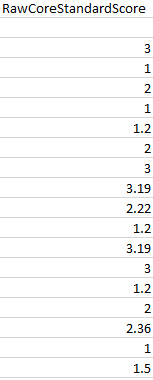
7. The next column to the right will indicate how the score is currently being calculated. A student must have 2 or more scores for the Power Law to start calculating. The column will either say Power Law or Only Score.
 8. The next columns will be assessment specific. The overall assessment score will be the first column (below in blue). Followed by the date(s) the assessment was given (below in yellow). The column(s) after the date indicate all the questions on the assessment that were used calculate the score for this particular assessment (below in purple).
